
CHOOSE RETRO IF
Keep your next steps close.
You prefer attributed feedback, optional meeting rounds and explicit publishing of agreed work into Linear.
Explore Retro’s featuresA LITTLE BETTER, TOGETHER
The right tool depends on how your team reflects, makes decisions and follows through. Here is how the two approaches compare.
CHOOSE RETRO IF
You prefer attributed feedback, optional meeting rounds and explicit publishing of agreed work into Linear.
Explore Retro’s featuresCONSIDER RETRIUM IF
You value anonymous comments, a choice of retrospective techniques and a team room for meeting history.
Explore RetriumSIDE BY SIDE
Capabilities can depend on plan and configuration. Each source link describes the Retrium capability beside it.
Scroll across the table to see both tools
| What matters | Retro by Bit Zesty | Retrium |
|---|---|---|
| Board and meeting format | Three editable columns, named groups and optional guided meeting rounds. | Guided facilitation with preset techniques and custom formats. Source |
| Reflection and prioritisation | Private writing with a shared reveal, attributed notes and blind voting rounds. | Private brainstorming, theme grouping and prioritisation; anonymous comments. Source |
| Following through | Action owners and due dates, facilitator-controlled Linear publishing and sync, PDF and JSON exports. | Action plans and retrospective history within team rooms. Source |
| Beyond the retrospective | A dedicated retrospective board. No planning poker, health-check dashboard or freeform whiteboard. | A dedicated facilitation and retrospective toolkit. Source |
INSIDE RETRO
Write independently, group related ideas and choose what to discuss. Capture an owner and due date for agreed actions, then publish selected work to Linear when you are ready.
Invited participants can join as guests. Private reflection hides writing until reveal; shared notes retain their authors’ names.
See Retro plans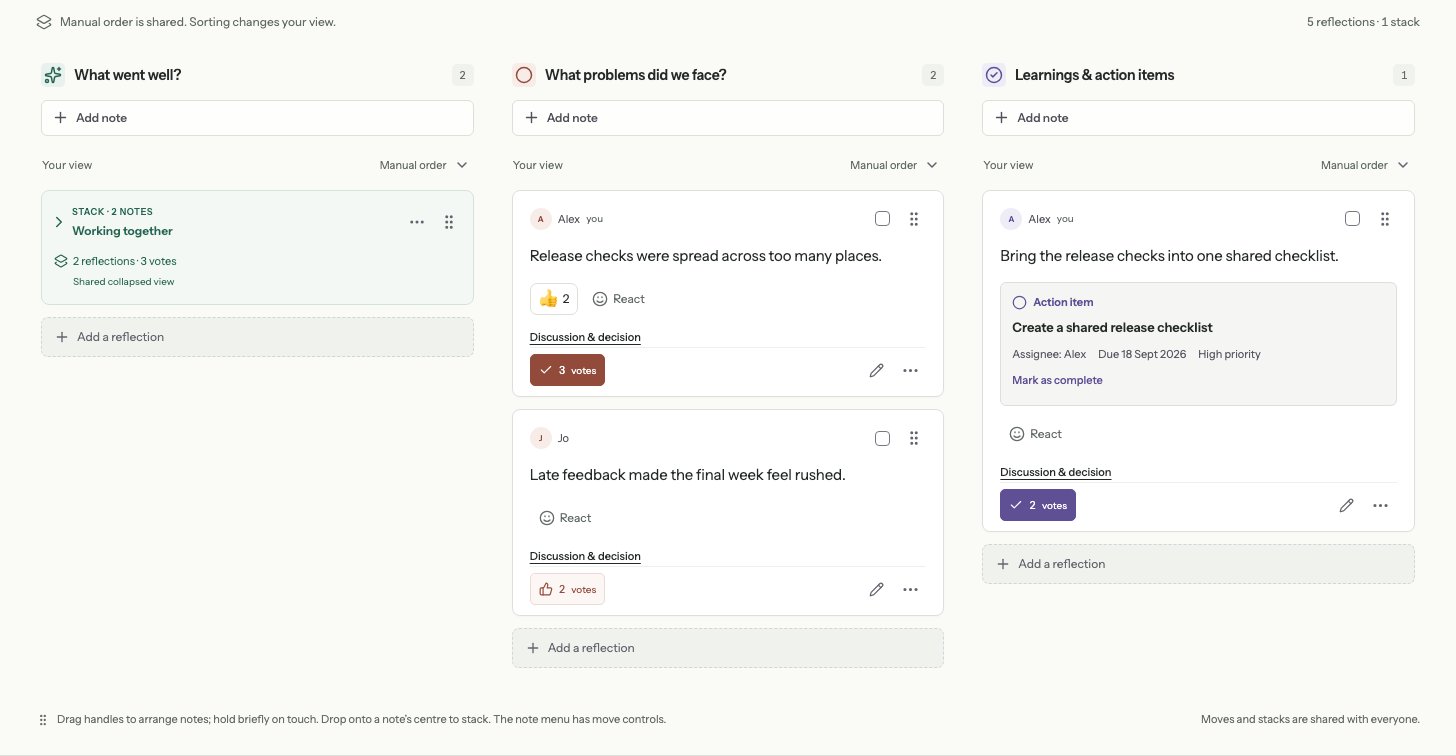
BEFORE YOU CHOOSE
Retro does not currently import competitor boards. Keep your existing history in Retrium or export it there, then start a fresh Retro board for your next meeting. You can download Retro outcomes as PDF or JSON.
Compare your team size, meeting frequency and required features against each tool’s current plan. Retro’s pricing page explains its workspace allowance and participant limits. Check Retrium’s plans on its official website.
Bit Zesty, the team behind Retro, compared Retro’s implemented features with the official pages linked below. The recommendations are our assessment of fit, not a hands-on competitor benchmark. An unlisted feature should not be read as unavailable.
MAKE ROOM FOR THE CONVERSATION
Bring your team, agree what matters and leave with a next step.